
무엇을 도와드릴까요?
make shop make signature
개별디자인 TIP
개별디자인 TIP
 상품관련
상품관련
기간할인 가격 노출 방법
먼저 관리자 [상품관리 > 판매상품 기본관리 > 상품 기간할인 설정]에서 할인타입을 [기간 할인]으로 선택해서 기간할인을 생성해 주세요.
이후 해당 기간할인을 원하시는 상품들에 설정해 주셔야 하는데요.
개별상품 단위로 설정원하실 경우 관리자 [상품관리 > 판매상품 기본관리 > 전체상품 통합관리]에서
상품명을 클릭하면 접속되는 [등록 상품 수정/삭제] 창 내 [상품 이벤트/제한 설정] 에서 할인설정 항목을 [사용]으로 선택해 주세요.
다음으로, 기간할인의 [검색] 버튼을 클릭, 접속되는 창에서 적용 원하시는 기간할인을 선택해서 추가하신 후 수정해 주세요.
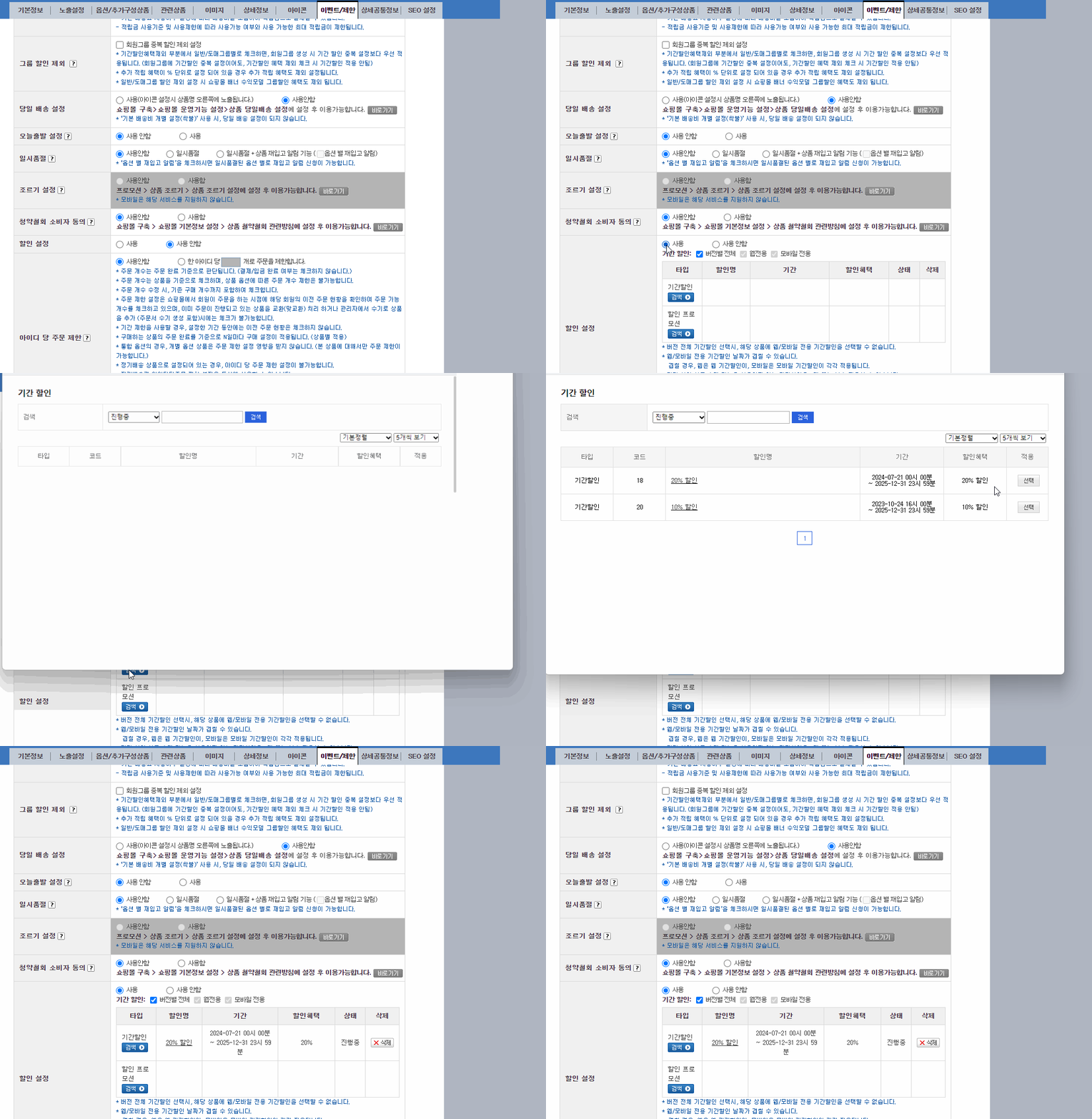 또는 여러 상품들에 일괄 설정 원하실 경우에는 [상품관리 > 상품관리 부가기능 > 상품 할인 일괄설정]에서
원하시는 상품들에 원하시는 기간할인을 일괄로 설정해 주세요.
▶ 참고 : [상품관리] 상품 할인 일괄설정 (클릭)
PC버전 기본스킨 Basic simple 과 모바일버전 개별디자인 기본 스킨의 메인, 상품 분류/검색결과, 상품 상세 페이지에는
기본 소스로 할인가격이 노출되도록 이미 작업되어 있어서 별도로 개별디자인 소스 수정 작업은 필요하지 않아요.
만약 현재 확인중이신 스킨에 할인가격 관련 가상 태그가 작업되어 있지 않아 노출되지 않는다면
각 페이지에서 판매가격을 노출시키는 price_sell 태그들을 찾아서 할인 적용된 가격이 노출되도록 수정이 필요해요.
▶페이지별 판매가격 price_sell 태그 [클릭해서 펼쳐보기]
아래 안내해드리는 내용들을 참고하여 쇼핑몰 디자인이 틀어지지 않도록 주의해서 할인 적용된 가격이 노출되도록 소스를 수정해 주세요.
 또는 여러 상품들에 일괄 설정 원하실 경우에는 [상품관리 > 상품관리 부가기능 > 상품 할인 일괄설정]에서
원하시는 상품들에 원하시는 기간할인을 일괄로 설정해 주세요.
▶ 참고 : [상품관리] 상품 할인 일괄설정 (클릭)
PC버전 기본스킨 Basic simple 과 모바일버전 개별디자인 기본 스킨의 메인, 상품 분류/검색결과, 상품 상세 페이지에는
기본 소스로 할인가격이 노출되도록 이미 작업되어 있어서 별도로 개별디자인 소스 수정 작업은 필요하지 않아요.
만약 현재 확인중이신 스킨에 할인가격 관련 가상 태그가 작업되어 있지 않아 노출되지 않는다면
각 페이지에서 판매가격을 노출시키는 price_sell 태그들을 찾아서 할인 적용된 가격이 노출되도록 수정이 필요해요.
▶페이지별 판매가격 price_sell 태그 [클릭해서 펼쳐보기]
아래 안내해드리는 내용들을 참고하여 쇼핑몰 디자인이 틀어지지 않도록 주의해서 할인 적용된 가격이 노출되도록 소스를 수정해 주세요.
[ PC 버전 ]
관리자 [개별디자인 > 디자인 스킨 관리 > 디자인 스킨 관리]
내 쇼핑몰 스킨 또는 디자인 스킨 뱅크 중 개별디자인 편집 작업을 원하는 스킨의 디자인 편집창
아래 예시는 모두 기본 스킨 Basic simple 기본 소스 기준
1. 메인
[개별디자인 > 중앙 디자인 > 메인 > 메인] 페이지 메인 신규코너 new_product 기준
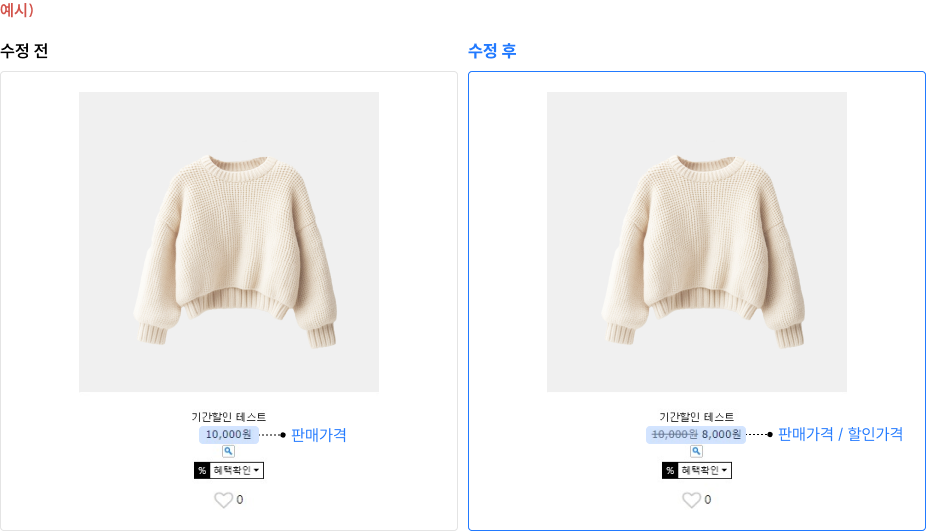 수정 전
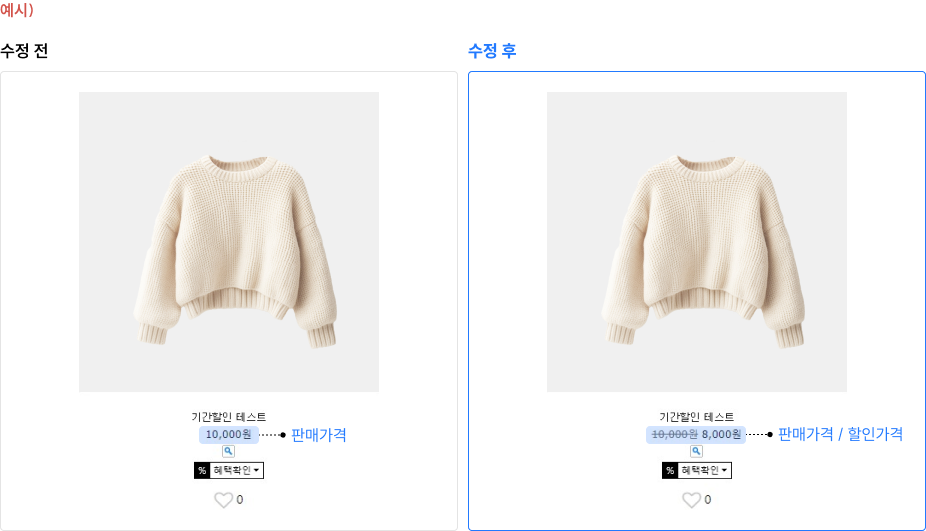 수정 전
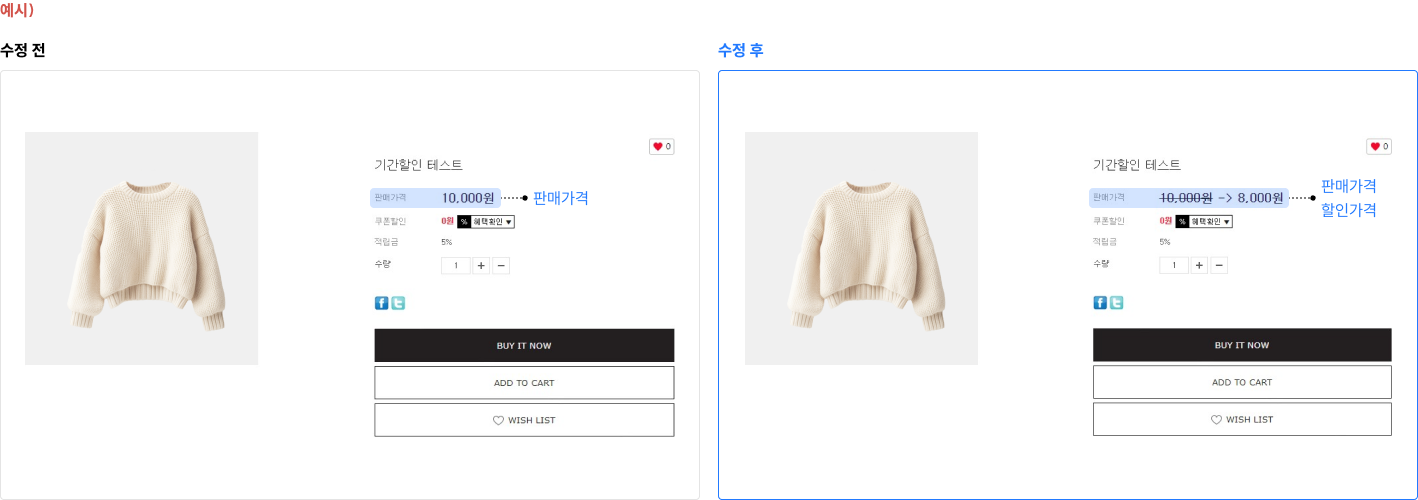 수정 전
 수정 전
<!--/if_new_product@price_consumer(+1)/-->
<strike><!--/number/new_product@price_consumer/-->원</strike>
<!--/end_if/-->
<span class="price"><!--/number/new_product@price_sell/-->원</span>
수정 후
<!--/if_new_product@price_discount/-->
<strike><!--/number/new_product@price_sell/-->원</strike>
<span class="price"><!--/number/new_product@price_discount/-->원</span>
<!--/else/-->
<!--/if_new_product@price_consumer(+1)/-->
<strike><!--/number/new_product@price_consumer/-->원</strike>
<!--/end_if/-->
<span class="price"><!--/number/new_product@price_sell/-->원</span>
<!--/end_if/-->
구조 설명
<!--/if_메인코너_product@price_discount/--> ~ <!--/else/--> : 할인 적용시 노출될 내용
<!--/else/--> ~ <!--/end_if/--> : 할인 적용되지 않을 때 노출될 내용
2. 상품 분류 / 검색결과
[개별디자인 > 중앙 디자인 > 상품관련 > 상품 분류 페이지 > 기본 분류 페이지]
[개별디자인 > 중앙 디자인 > 상품관련 > 상품 검색 결과 화면]
 수정 전
<strike><!--/number/product@price_consumer/-->원</strike>
<!--/end_if/-->
<span class="price"><!--/number/product@price_sell/-->원</span>
수정 후
<!--/if_product@price_discount/-->
<strike><!--/number/product@price_sell/-->원</strike>
<span class="price"><!--/number/product@price_discount/-->원</span>
<!--/else/-->
<!--/if_product@price_consumer(+1)/-->
<strike><!--/number/product@price_consumer/-->원</strike>
<!--/end_if/-->
<span class="price"><!--/number/product@price_sell/-->원</span>
<!--/end_if/-->
구조 설명
<!--/if_product@price_discount/--> ~ <!--/else/--> : 할인 적용시 노출될 내용
<!--/else/--> ~ <!--/end_if/--> : 할인 적용되지 않을 때 노출될 내용
3. 상품 상세
[개별디자인 > 중앙 디자인 > 상품관련 > 상품 상세 페이지 > 기본 상세 페이지]
 수정 전
<tr>
<th scope="row"><div class="tb-left">판매가격</div></th>
<td class="price sell_price">
<div class="tb-left">
<!--/if_replace_price/-->
<!--/replace_price/-->
<!--/else/-->
<!--/number/price_sell/-->원
<!--/end_if/-->
</div>
</td>
</tr>
수정 후
<tr>
<th scope="row"><div class="tb-left">판매가격</div></th>
<td class="price sell_price">
<div class="tb-left">
<!--/if_replace_price/-->
<!--/replace_price/-->
<!--/else/-->
<!--/if_dc_price_sell/-->
<strike><!--/number/price_sell/-->원</strike> -> <!--/block_dc_price_sell/--><!--/number/dc_price_sell/--><!--/end_block/-->원
<!--/else/-->
<!--/number/price_sell/-->원
<!--/end_if/-->
<!--/end_if/-->
</div>
</td>
</tr>
구조 설명
<!--/if_dc_price_sell/--> ~ <!--/else/--> : 할인 적용시 노출될 내용
<!--/else/--> ~ <!--/end_if/--> : 할인 적용되지 않을 때 노출될 내용
[ 모바일 버전 ]
관리자 [모바일샵 > 모바일샵 설정 > 모바일 D4(개별디자인)]
내 모바일샵 스킨 또는 보관 스킨 중 개별디자인 편집 작업을 원하는 스킨의 디자인 편집창
아래 예시는 모두 모바일D4 기본 소스 기준
1. 메인
모바일 [디자인 편집창 > 중앙 디자인 > 메인 > 메인]페이지 메인 신규코너 new_product 기준
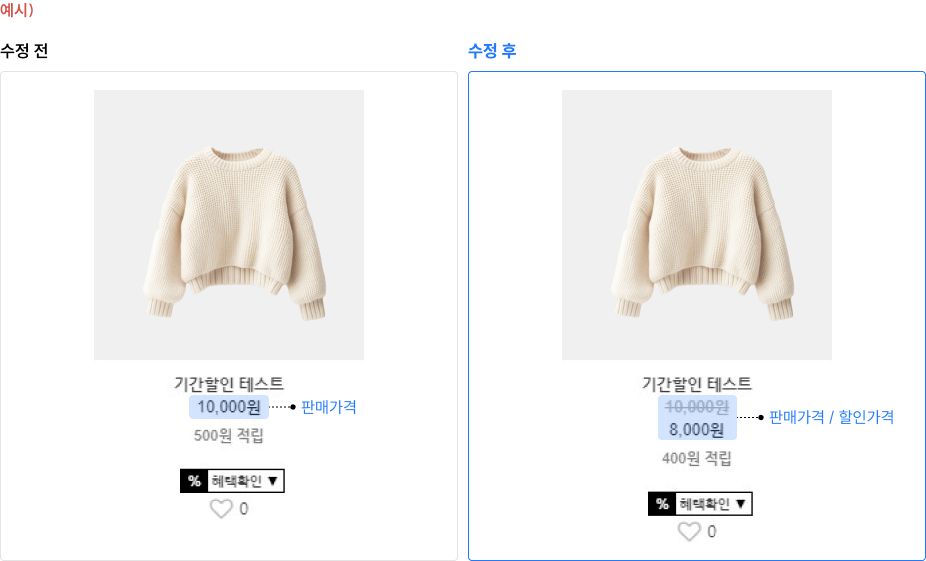 수정 전
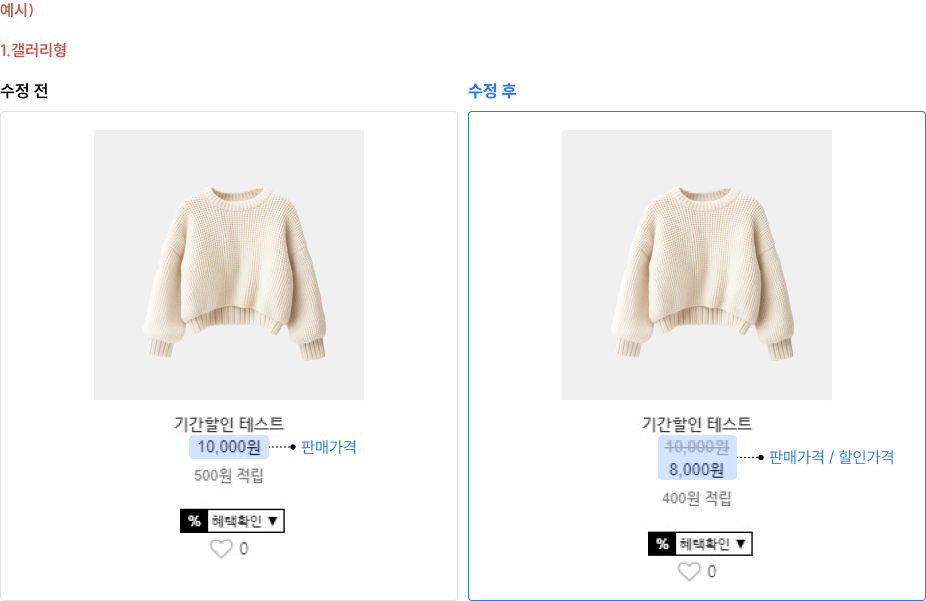
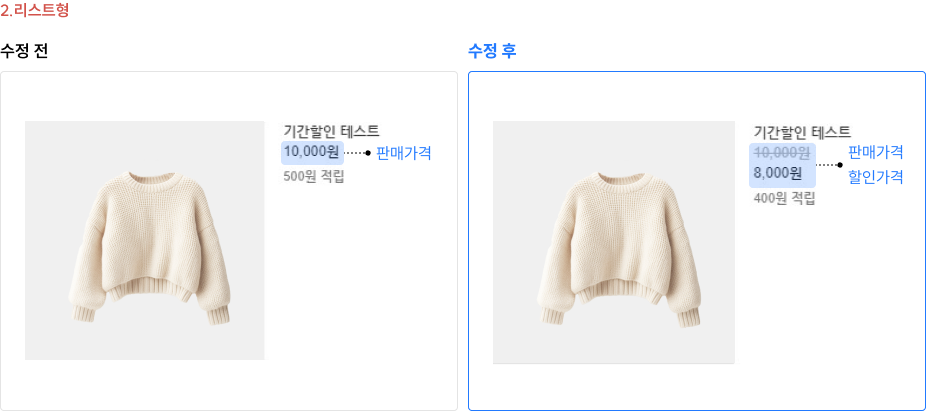 수정 전
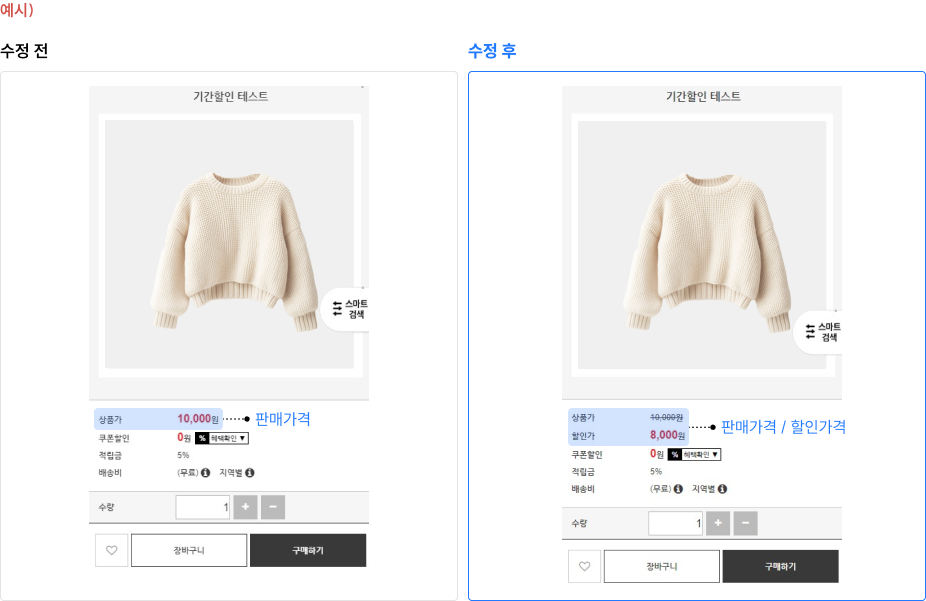 수정 전
할인가격 외에 기간할인의 기간, 할인율 등 추가 정보 노출을 원하실 경우 아래 개별디자인 TIP 내용을 참고해주세요.
▶ 기간할인 정보(기간, 메시지, 아이콘 등) 노출 방법 (클릭)
감사합니다.  수정 전
<p class="listPrice"><!--/number/new_product_list@price_sell/-->원</p>
수정 후
<!--/if_new_product_list@price_discount/-->
<p class="listDiscount"><del><!--/number/new_product_list@price_sell/-->원</del></p>
<p class="listPrice">
<!--/if_new_product_list@discount_apply_type(mobile)/-->
<span class="fa fa-mobile fa-lg"></span>
<!--/end_if/-->
<!--/number/new_product_list@price_discount/-->원
</p>
<!--/else/-->
<p class="listPrice"><!--/number/new_product_list@price_sell/-->원</p>
<!--/end_if/-->
구조 설명
<!--/if_메인코너_product_list@price_discount/--> ~ <!--/else/--> : 할인 적용시 노출될 내용
<!--/else/--> ~ <!--/end_if/--> : 할인 적용되지 않을 때 노출될 내용
2. 상품 분류 / 검색결과 - 2개 영역 모두 수정 필요(갤러리형, 리스트형)
모바일 [디자인 편집창 > 중앙 디자인 > 상품관련 > 상품 분류 페이지 > 기본 분류 페이지]
모바일 [디자인 편집창 > 중앙 디자인 > 상품관련 > 상품 검색 결과 화면]
 수정 전
<p class="listPrice"><!--/number/product_list@price_sell/-->원</p>
수정 후
<!--/if_product_list@price_discount/-->
<p class="listDiscount"><del><!--/number/product_list@price_sell/-->원</del></p>
<p class="listPrice">
<!--/if_product_list@discount_apply_type(mobile)/-->
<span class="fa fa-mobile fa-lg"></span>
<!--/end_if/-->
<!--/number/product_list@price_discount/-->원
</p>
<!--/else/-->
<p class="listPrice"><!--/number/product_list@price_sell/-->원</p>
<!--/end_if/-->
구조 설명
<!--/if_product_list@price_discount/--> ~ <!--/else/--> : 할인 적용시 노출될 내용
<!--/else/--> ~ <!--/end_if/--> : 할인 적용되지 않을 때 노출될 내용
3. 상품 상세
모바일 [디자인 편집창 > 중앙 디자인 > 상품관련 > 상품 상세 페이지 > 기본 상세 페이지]
 수정 전
<p>
<span class="shopdetailInfoName">상품가</span>
<span class="shopdetailInfoCont">
<!--/if_price_replace/-->
<!--/price_replace/-->
<!--/else/-->
<em class="bold"><!--/number/price_sell/--></em>원
<!--/end_if/-->
</span>
</p>
수정 후
<p>
<span class="shopdetailInfoName">상품가</span>
<span class="shopdetailInfoCont">
<!--/if_price_replace/-->
<!--/price_replace/-->
<!--/else/-->
<!--/if_dc_price_sell/-->
<del><!--/number/price_sell/-->원</del>
<!--/else/-->
<em class="bold"><!--/number/price_sell/--></em>원
<!--/end_if/-->
<!--/end_if/-->
</span>
</p>
<!--/if_dc_price_sell/-->
<p class="shopdetailInfoDiscount bold">
<!--/if_discount_apply_type(mobile)/-->
<span class="shopdetailInfoName"><span class="fa fa-mobile fa-lg"></span> 모바일가</span>
<!--/else/-->
<span class="shopdetailInfoName">할인가</span>
<!--/end_if/-->
<span class="shopdetailInfoCont"><em><!--/block_dc_price_sell/--><!--/number/dc_price_sell/--><!--/end_block/--></em>원</span>
</p>
<!--/end_if/-->
구조 설명
<!--/if_dc_price_sell/--> ~ <!--/else/--> : 할인 적용시 노출될 내용
<!--/else/--> ~ <!--/end_if/--> : 할인 적용되지 않을 때 노출될 내용
두번째 <!--/if_dc_price_sell/--> ~ <!--/end_if/--> : 할인 적용시 노출될 내용
-
이전 글
-
다음 글